 PowerupStack
Looking to launch your own Minecraft server without spending a dime? Whether you're building epic worlds with friends, running plugins, or hosting mini-games, finding a reliable and free server host can be a game-changer. The best part? You don’t need deep pockets to enjoy smooth gameplay and plugin support.
In this guide, we'll walk you through how to set up your free Minecraft server with PowerupStack—a platform built for players who want performance without the price tag.
Why host your Minecraft server with PowerupStack?
PowerupStack offers a powerful, no-cost hosting solution designed for casual players and serious builders alike. Here’s what makes it stand out:
- Auto-startup: Your Java or Bedrock server boots automatically when a player joins.
- Global servers: The Free tier is available in Europe, North America, Singapore and Australia, so you can choose a location near your players.
- Custom subdomain: Java Edition players connect without entering a port because the address uses a DNS SRV record. Bedrock Edition players enter the assigned port shown in the panel.
- 3 GB RAM: Enough memory to play with friends and run plugins smoothly.
- 4 GB storage: Space for the complete server, including worlds, plugins, mods, logs, and other files.
- Plugin support: Installed approved content from the built-in workshop.
- Automatic world optimization: Keeps your disk usage efficient and under control.
How to create your free Minecraft server
For complete instructions, including Java and Bedrock connection details, follow the free Minecraft server setup guide. The basic steps are:
- Sign up for an account
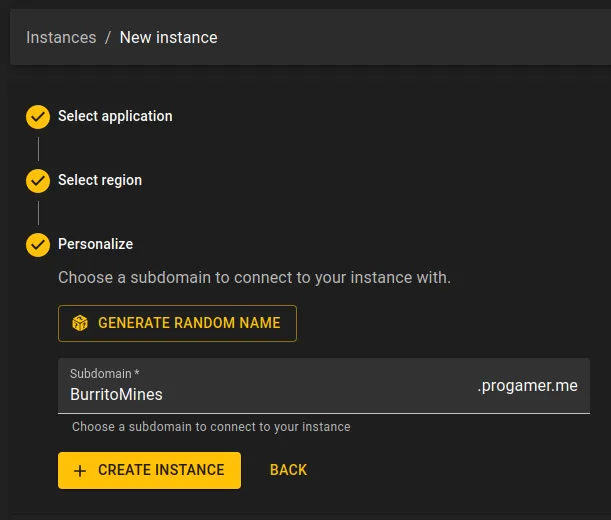
- Go to the instances page and create a new Minecraft instance:
- Choose your server software (e.g. Vanilla Minecraft)
- Pick your Minecraft version (e.g. 26.2)
- Select the region closest to most players for the lowest likely latency. Restricted scheduling is enabled by default, so the server runs only in the selected region.
- Choose the Free plan, which is available in Europe, North America, Singapore and Australia
- Choose a subdomain for easy connection (e.g.
myserver.progamer.me) - Click Create instance
- Start your server for the first time. You'll be prompted to accept the Minecraft EULA.
- Once it is running, connect using the details shown in the panel. Java Edition uses the server address without a port because it supports DNS SRV records. Bedrock Edition does not support SRV records, so players must enter the assigned port instead of assuming the default
19132port.
How is this free?
You might be wondering: how can PowerupStack afford to offer free servers?
It’s all about smart resource management. PowerupStack runs on a freemium model—paid game servers help fund the free ones. By using unused compute capacity and deploying dedicated infrastructure when needed, we keep costs low and performance high.
This flexible setup allows PowerupStack to scale resources based on demand, ensuring the free hosting remains sustainable long-term.
Limitations to keep in mind
To keep things fair and stable, free servers come with sensible limits:
- The server shuts down five minutes after the last player leaves. Paid servers can use a timeout from 1 to 120 minutes or disable automatic shutdown for 24/7 operation.
- The storage limit is 4 GB, including all worlds, plugins, mods, logs, and other files. Servers exceeding it will not start; see how to free up disk space.
- Only approved mods and plugins from the workshop can be installed. You can request a workshop component for review.
- Inactive servers may be deleted (you’ll get a heads-up email).
- During peak times, free servers may experience queueing delays.
Ready to build your world?
Create your free Minecraft server now and start crafting with zero cost and
zero hassle.